
You spent good money on custom screen printed shirts, whether for your crew, your team, or your brand. The last thing you want is to pull them out of the dryer looking cracked and faded after two washes. Knowing how to wash screen printed shirts the right way is the difference between a design that holds up for years and one that starts peeling within weeks. It’s a simple process, but most people get a few key details wrong.
At Dr. Tee’s Design & Screen Printing, we’ve been producing custom apparel in Kansas City for over 20 years. We’ve seen firsthand how proper care extends the life of a printed garment, and how poor washing habits destroy even the highest-quality prints. Our customers regularly ask us for care tips after picking up their orders, so we put together everything we know into this guide.
Below, you’ll find step-by-step instructions for washing, drying, and storing your screen printed shirts so the design stays sharp and vibrant. We’ll also cover common mistakes to avoid and a few lesser-known tricks that actually work.
What ruins screen prints in the wash
Screen printed ink sits on top of the fabric fibers, not woven into them. That means the ink layer is exposed and vulnerable every time you run it through a wash cycle. Understanding what actually damages prints helps you avoid the specific mistakes that shorten a shirt’s lifespan far faster than normal wear ever would.
Heat breaks down the ink bond
Hot water and high dryer temperatures are the two fastest ways to destroy a screen print. High heat causes the ink to expand and contract, which weakens the bond between the ink and the fabric over time. Once that bond starts to fail, cracking and peeling follow quickly. Most screen printed shirts can handle dozens of washes if you keep temperatures low, but a single high-heat cycle can begin the degradation process you can’t reverse. Plastisol ink, the most common type used in professional screen printing, becomes brittle when repeatedly exposed to heat stress.
Washing your shirts in hot water even once can start a cracking pattern that only gets worse with every wash after that.
Friction and harsh chemicals do the rest
Washing the shirt right-side out in a packed load creates friction against other garments, and that physical abrasion scrubs the print surface repeatedly. Over time, this dulls the ink and wears down the sharp edges of your design. Harsh detergents with bleach or strong enzymes break down the ink chemistry directly, especially on water-based and discharge prints. Fabric softeners are not as harmless as they seem either. They leave a waxy coating on the fabric surface that gradually degrades ink adhesion. Stick to a mild, dye-free detergent and you eliminate most chemical damage entirely.
Before you wash: quick prep checklist
Two minutes of prep before each wash can extend the life of your print significantly. When you know how to wash screen printed shirts correctly, you start before the machine even turns on.
Taking these steps before every wash adds almost no time but prevents most of the damage that happens during a typical laundry cycle.
Flip it and sort your load
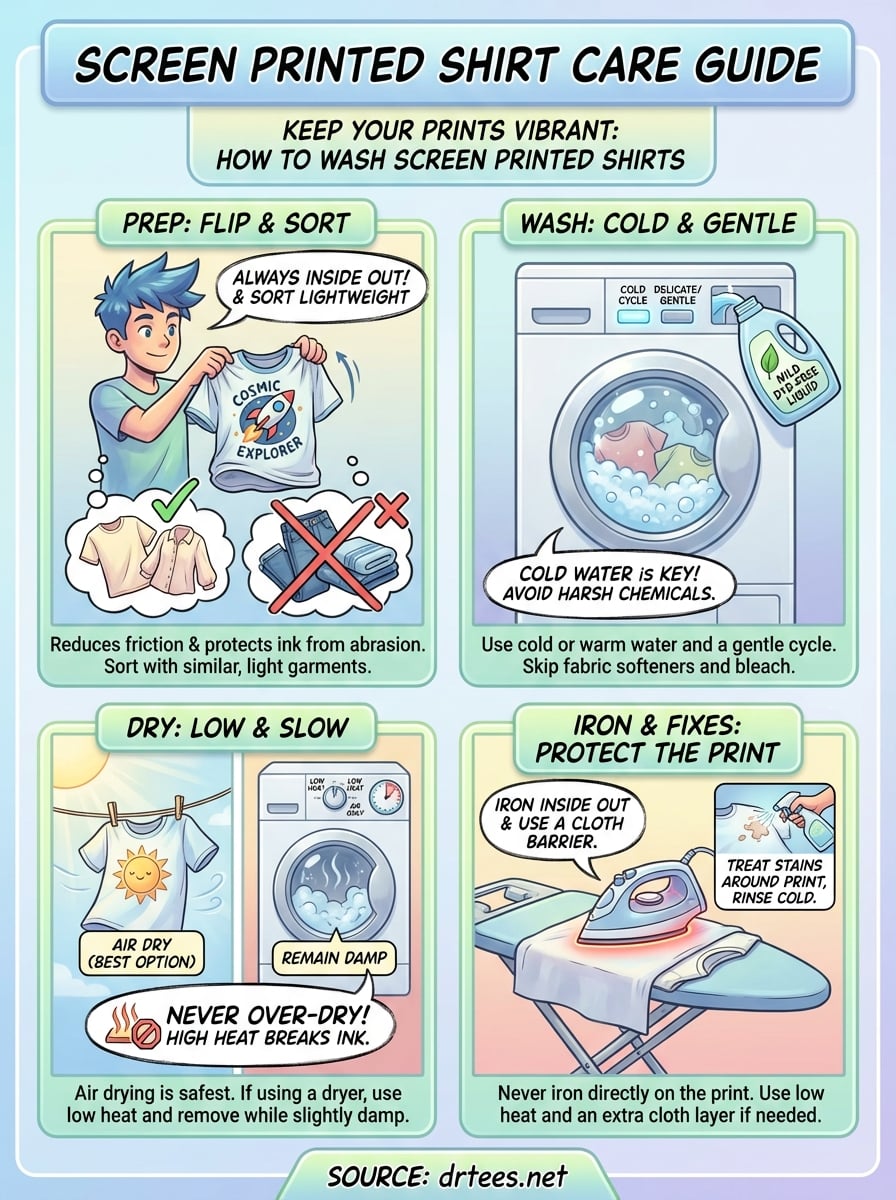
Always turn your shirt inside out before it goes in the wash. This puts the printed surface away from direct contact with other garments, which reduces friction against the ink. Check the inside of the shirt for any loose threads or debris that could snag or abrade the print during agitation.

Sort your laundry so printed shirts are washed with lightweight, similar items rather than heavy fabrics like jeans or towels. Heavy garments create more friction and can grind against your print through an entire cycle. Use this quick checklist before every wash:
- Turn shirt inside out
- Check the care label for fabric restrictions
- Sort with lightweight garments only
- Pre-treat any stains away from the print area
- Select a cold or warm water setting, never hot
Wash by machine without cracking the print
Machine washing is fine for screen printed shirts as long as you control the two variables that do the most damage: heat and agitation. Most people skip both of these steps and wonder why their prints look worn after a few months. When you follow the right machine settings, knowing how to wash screen printed shirts by machine becomes a straightforward routine.
Choose the right cycle and temperature
Set your machine to a cold water cycle every time. Warm water is acceptable for older, more durable prints, but cold is always the safer choice. Pick the gentle or delicate cycle to reduce the mechanical agitation that grinds fabric against fabric throughout the wash.
Cold water on a gentle cycle is the single most impactful change you can make to extend the life of a screen print.
Pick the right detergent and load size
Use a mild, dye-free liquid detergent without bleach or added enzymes. Powder detergents can leave residue that builds up on the ink surface over time. Skip fabric softener entirely since it coats the fabric in a way that weakens ink adhesion wash after wash. Keep your load size moderate so the shirts have room to move without constant friction against heavier items.
Hand-wash method for delicate or new prints
Hand washing gives you complete control over heat and friction, which makes it the best option for brand-new prints or shirts made from delicate fabrics like tri-blends. When you think about how to wash screen printed shirts that are fresh off the press, the first few washes matter most because the ink is still settling into its final bond with the fabric.
Step-by-step hand wash process
Fill a sink or bucket with cold water and add a small amount of mild, dye-free liquid detergent. Turn the shirt inside out and submerge it fully. Gently work the fabric with your hands for two to three minutes, focusing on any soiled areas while keeping direct pressure away from the printed section.
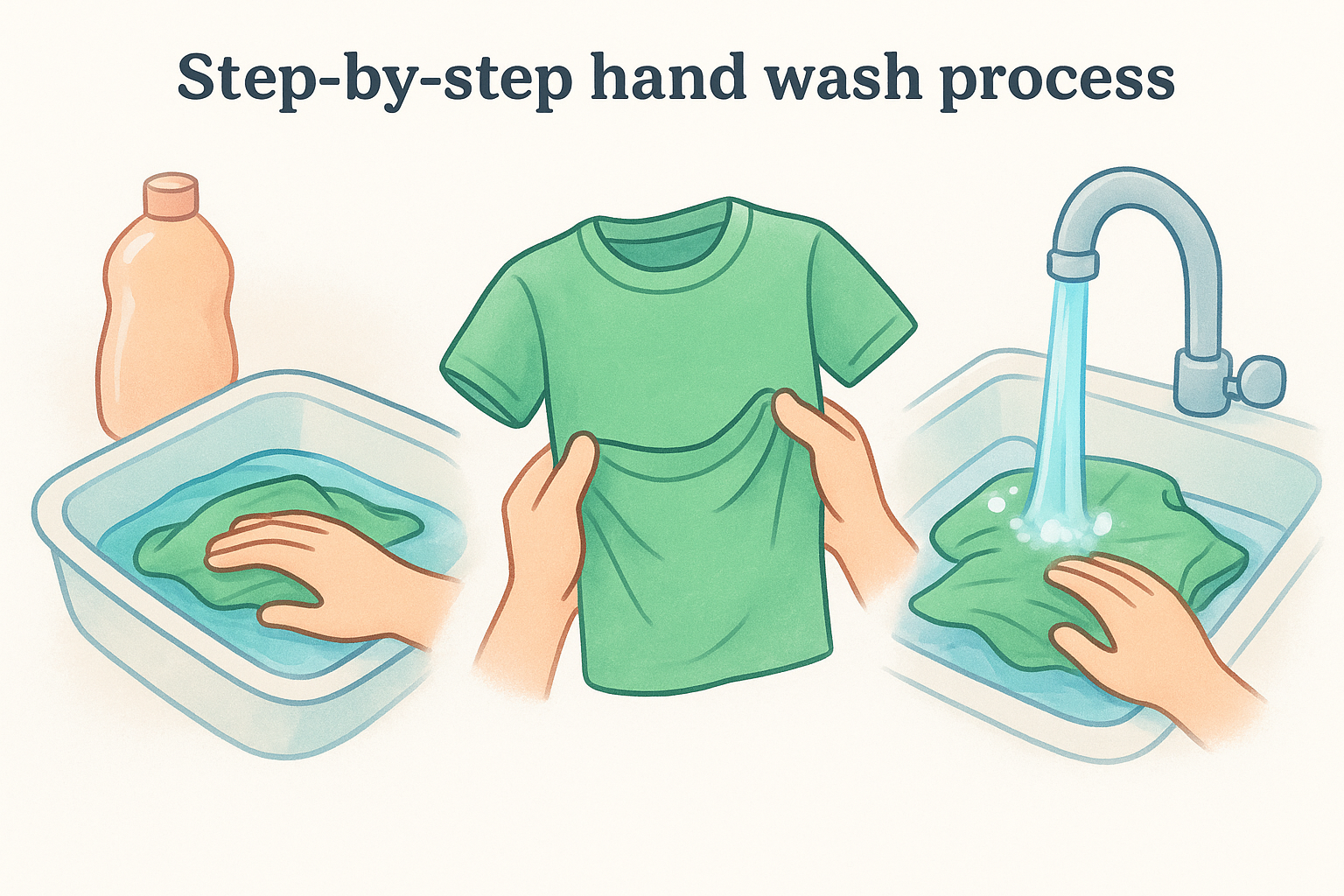
Avoid scrubbing directly over the print. Use light squeezing motions instead to clean the fabric without stressing the ink layer.
Rinse the shirt thoroughly under cool running water until no soap remains. Skip wringing the shirt to squeeze out water since that twists and stresses the fabric. Instead, press the shirt flat against the sink basin to push out excess water before moving it somewhere to dry.
Drying, ironing, and stain fixes
Washing is only half the equation when you think about how to wash screen printed shirts the right way. What you do after the wash cycle ends can cause just as much damage as the wrong machine settings. Heat from drying and direct contact from an iron are two of the most common ways people unknowingly ruin a print they just carefully washed.
Dry low and slow
Set your dryer to low heat or air-dry mode and remove the shirt while it still feels slightly damp. Lay it flat or hang it to finish drying away from direct sunlight, which fades ink over time. Never over-dry a screen printed shirt because excess heat in the final minutes of a cycle does the most structural damage to the ink layer.
Air drying is always the safest option and costs you nothing extra.
Iron and treat stains without damage
If you need to iron the shirt, turn it inside out and keep the iron on a low setting. Never iron directly over the print. Place a thin cotton cloth between the iron and the garment as an extra buffer.
For stains near the print, apply a small amount of mild stain remover to the fabric only, not the ink, and rinse immediately with cold water before washing normally.
Keep your prints looking new
The habits in this guide are simple and repeatable. Cold water, a gentle cycle, and turning the shirt inside out cover the most important steps. Avoiding high heat in the dryer and keeping the iron off the print surface handles the rest. Follow these steps consistently and your shirts will stay sharp for years, not just a few washes.
Knowing how to wash screen printed shirts the right way also protects your investment. Whether you ordered 12 shirts for a small crew or 500 pieces for an event, proper care starts the moment the shirt leaves the printer. The print quality begins with how the shirt is made, and it ends with how you treat it at home.
When you need custom screen printed shirts built to last from the start, get a quote from Dr. Tee’s Design & Screen Printing and find out what over 20 years of Kansas City print experience delivers on every order.
