
A strong logo is the foundation of every brand, whether it’s going on a business card, a website, or screen printed across 500 custom t-shirts. Choosing the best software for logo design determines how efficiently you can create something professional, versatile, and ready for production.
But the options range from expensive professional suites to completely free browser-based tools, and each one has real trade-offs. Some excel at vector precision for print-ready artwork, while others prioritize speed and simplicity for people who’ve never touched a design program. Picking the wrong tool can mean wasted hours, a logo that won’t scale, or artwork that falls apart the moment it hits a press.
At Dr. Tee’s Design & Screen Printing, we’ve spent over 20 years creating logos and preparing artwork for screen printing and embroidery in Kansas City. We know exactly what makes a logo work, and which tools actually produce files that are ready for production. That hands-on experience shaped this list. Below, we break down 12 of the best free and paid logo design software options for 2026, covering what each one does well, where it falls short, and who it’s best suited for.
1. Dr. Tee’s Online Design Tool
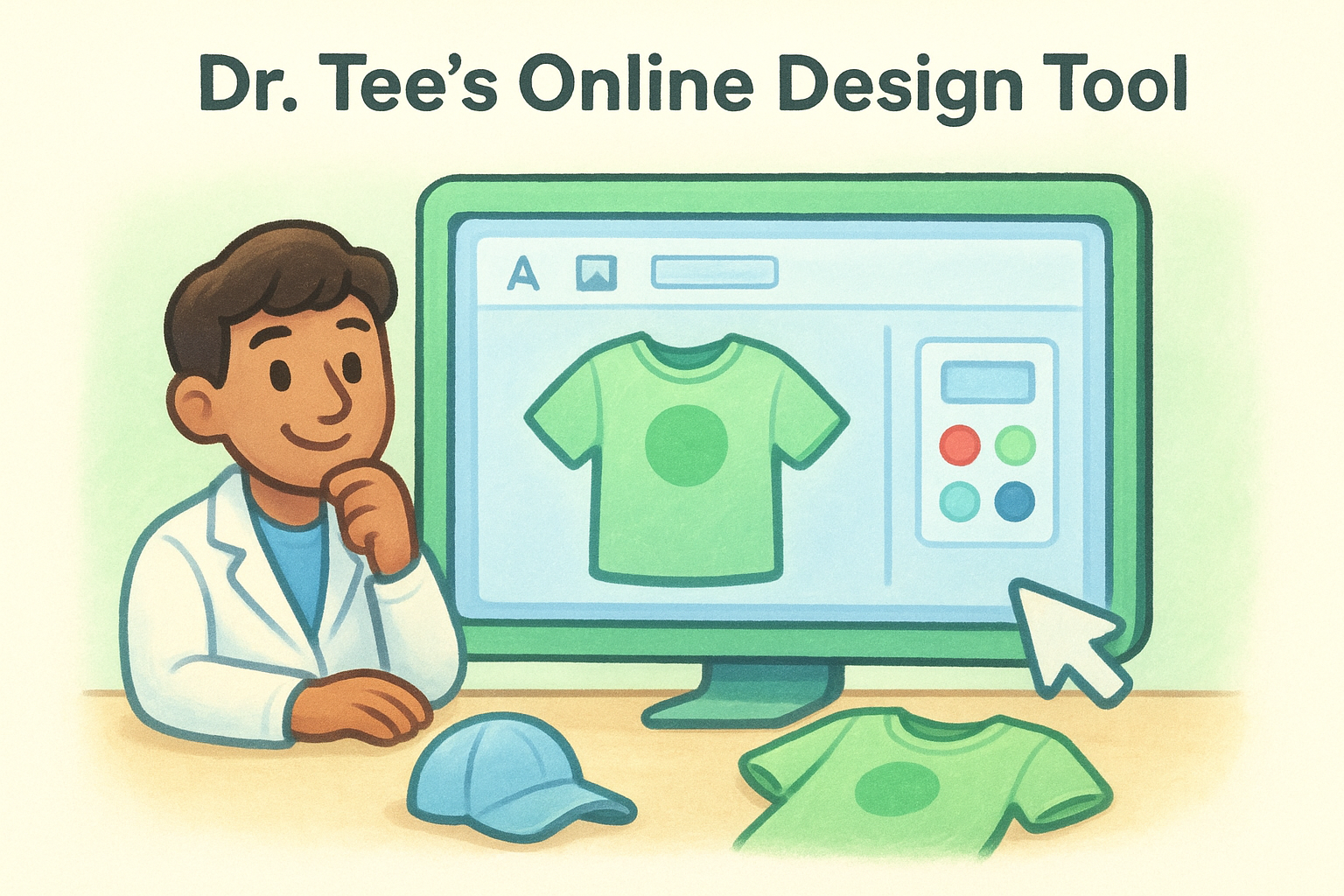
Dr. Tee’s online design tool is built specifically for customers who need custom branded apparel without having to learn professional software first. It lives directly on the drtees.net website, which means you can build your design and submit it for screen printing or embroidery in one place, without bouncing between different apps or sending files back and forth.
Best for
This tool is best suited for small business owners, team organizers, and individuals who need branded shirts, hats, or tote bags but have no background in design. If you know what you want on your garment but don’t know how to build a print-ready file, this is exactly the direct, low-friction starting point you need to get an order placed and into production.
What you can create
You can build custom apparel designs using text, uploaded graphics, clip art, and basic shapes directly in your browser. The tool supports artwork placement for multiple garment types, including:
- T-shirts, sweatshirts, and hoodies
- Polo shirts and tank tops
- Hats and tote bags
You can position your logo or artwork on specific print locations, adjust sizing, and preview the final product before you ever place an order.
Workflow and handoff for print and web
The workflow is direct. You design your item on the platform, and the file goes straight to Dr. Tee’s production team for review. There is no file conversion required on your end, and the team checks your artwork before it hits the press. This eliminates the common problem of sending a file that looks fine on screen but produces poor results in production.
When the design tool and the print shop are the same place, you cut out the back-and-forth that wastes time and causes errors.
Limitations to know
This tool is purpose-built for apparel ordering, not standalone logo creation. If you need a logo file for your website, business cards, or signage outside of print, you will not be able to export a standalone vector file from the platform. For that level of file portability, you will want to explore one of the other options covered in this guide to the best software for logo design and bring that finished file back here for production.
Pricing
Using the online design tool costs nothing. You pay for the apparel order itself, with pricing based on garment type, quantity, number of ink colors, and any embroidery services. Orders start at a minimum of 12 units, making it accessible for small runs without a large upfront commitment.
2. Adobe Illustrator
When people search for the best software for logo design at a professional level, Illustrator consistently tops the list. It has been the industry standard for vector work for decades, and for good reason. The software gives you complete control over every anchor point, curve, and path in your artwork, which is exactly what precise logo construction demands.
Best for
Illustrator is best for professional designers, in-house creative teams, and serious freelancers who need the most capable vector tool available. If you are creating logos that will appear on everything from business cards to billboards to screen-printed apparel, the precision and infinite scalability this software provides is hard to match.
What you can create
You can build virtually any type of logo in Illustrator, from clean wordmarks to complex illustrated marks with gradients, patterns, and detailed iconography. The Pen tool and Shape Builder give you full control over geometry and paths, while the type tools handle advanced typography with exact kerning and spacing.
Workflow and handoff for print and web
Illustrator exports print-ready vector files in formats like .ai, .eps, .pdf, and .svg. These are the exact file types that professional print shops need for screen printing and embroidery production.
If your logo starts in Illustrator, you eliminate nearly every file quality problem that shows up at the press.
Limitations to know
The learning curve is steep, and getting comfortable with the tools takes real time. Illustrator is not the right choice if you need a finished logo today with no prior design experience. It is also a subscription-based product, so you pay monthly whether you use it every day or once a quarter.
Pricing
Adobe Illustrator costs $22.99 per month as a standalone app, or you can access it through the full Creative Cloud plan at $59.99 per month.
3. Affinity Designer
Affinity Designer from Serif is one of the strongest one-time-purchase alternatives in the conversation about the best software for logo design. It runs on Mac, Windows, and iPad, and it handles vector and raster work in the same document, which gives you flexibility without needing to switch between applications.
Best for
Affinity Designer is best suited for freelancers, small business owners, and independent designers who want professional-grade vector tools without a monthly subscription. If you produce logos regularly but find Adobe’s pricing hard to justify, this is a capable alternative that covers most of the same ground.
What you can create
You can build sharp vector logos, wordmarks, and brand marks with full control over nodes, curves, and shapes. The software supports advanced typography, custom color palettes, and multi-artboard layouts, making it straightforward to create multiple logo variations within a single file.
A logo file that covers horizontal, stacked, and icon-only versions in one document saves significant time when you hand work off to a printer or web developer.
Workflow and handoff for print and web
Affinity Designer exports print-ready formats including .pdf, .svg, .eps, and .ai, which are the file types most professional screen printers and embroidery shops require. The export persona within the software gives you granular control over resolution, color profiles, and file format for each use case.
Limitations to know
Affinity Designer is not as widely supported as Illustrator in professional studio environments, and some print vendors and collaborators may request native .ai files that require additional conversion steps. The software also lacks some of the advanced automation features found in larger Adobe workflows.
Pricing
Affinity Designer 2 costs a one-time purchase of $69.99, with no subscription required.
4. CorelDRAW
CorelDRAW has been a legitimate contender in the conversation around the best software for logo design for over 30 years. It is a vector-based design suite built for Windows-first users, and it has a loyal following among sign makers, print shop operators, and independent designers who prefer its interface over Adobe’s.
Best for
CorelDRAW is best suited for Windows-based designers and print professionals who work heavily in production environments. It is especially popular in the commercial printing and sign-making industries, where its native file compatibility and color management tools give it a practical edge.
What you can create
You can build complete logo systems in CorelDRAW, including wordmarks, icon-based marks, and combination marks. The software handles typography, vector illustration, and multi-page documents within a single workspace, so you can keep all your brand variations organized in one file.
CorelDRAW’s layout tools make it straightforward to set up a logo sheet that covers every size and color variation your brand needs.
Workflow and handoff for print and web
CorelDRAW exports to standard print formats including .pdf, .eps, .svg, and .ai, covering most of what a screen printer or embroidery shop will ask for. The software also includes built-in color profile controls that help you match Pantone and CMYK values accurately before you send files to production.
Limitations to know
CorelDRAW is primarily a Windows application, and while a Mac version exists, it has historically lagged behind the Windows release in features and stability. Collaboration with designers using Illustrator-heavy workflows can require extra file conversion steps.
Pricing
CorelDRAW Graphics Suite is available for $249 per year as a subscription, or as a one-time purchase starting at $549.
5. Inkscape
Inkscape is a free, open-source vector editor that sits in the conversation around the best software for logo design specifically because it costs nothing and runs on Windows, Mac, and Linux. It has been developed and maintained by a community of contributors for over two decades, making it a surprisingly capable tool for anyone who needs vector design without a financial commitment.
Best for
Inkscape is best suited for budget-conscious designers, students, and small business owners who need professional vector capabilities but cannot justify a subscription or a large one-time purchase. If you are comfortable learning tools through documentation and community forums, you can build solid logo work here without spending a dollar.
What you can create
You can produce clean vector logos, wordmarks, and icon-based marks using Inkscape’s node editor, shape tools, and Bezier pen. The software supports multiple layers, grouping, and custom color palettes, so you can organize complex designs and maintain brand consistency across different size and color variations.
Inkscape’s native file format is SVG, which means your logo is already in one of the most web-compatible formats available from the moment you save.
Workflow and handoff for print and web
Inkscape exports to .svg, .pdf, and .eps formats, covering the core requirements most screen printers will ask for. You can also export PNG files at custom resolutions for web and digital use, making it versatile enough to handle both production handoffs and digital asset delivery in a single workflow.
Limitations to know
Inkscape’s interface feels dated compared to Illustrator or Affinity Designer, and some features require workarounds that slow down production. The software also handles complex files and large documents slowly, which becomes noticeable on older hardware.
Pricing
Inkscape is completely free to download and use, with no paid tiers or licensing fees attached.
6. Figma
Figma is a browser-based design tool that has shifted a large portion of the design industry away from desktop software over the past few years. While it was built primarily for UI and product design, its vector capabilities make it a functional option in discussions about the best software for logo design, especially for teams that collaborate in real time.
Best for
Figma is best suited for designers and brand teams who need to share work, collect feedback, and iterate quickly without emailing files back and forth. If your logo work happens inside a larger brand system or product design workflow, Figma keeps everything in one shared workspace that your entire team can access.
What you can create
You can build clean wordmarks, icon-based marks, and full logo lockups using Figma’s vector tools, pen tool, and component system. The auto-layout and frames features make it straightforward to set up multiple logo variations side by side for review without duplicating work.
Figma’s component system lets you update one version of your logo and have that change reflect across every frame in the file instantly.
Workflow and handoff for print and web
Figma exports to SVG and PNG for web and digital use. For screen printing production, you will typically need to bring your SVG into Illustrator or Affinity Designer to clean up paths and prepare a true print-ready file, since Figma’s export options do not cover .eps or structured .pdf formats natively.
Limitations to know
Figma is not built for print production, and its color management tools fall short of what professional screen printers require. Working offline is also limited compared to desktop-native tools.
Pricing
Figma’s free plan covers most solo logo work, with paid plans starting at $15 per editor per month.
7. Canva
Canva is a browser-based design platform that appears regularly in conversations about the best software for logo design because of how fast it lets you go from nothing to something that looks polished. It is built around drag-and-drop simplicity, making it genuinely accessible to anyone who needs a logo but has no formal design training.
Best for
Small business owners, entrepreneurs, and non-designers who need branded materials quickly get the most value out of Canva. If you need a logo that looks clean across social media profiles, presentations, and basic print materials, Canva gives you enough tools to produce something presentable without any prior design experience.
What you can create
You can build wordmarks, simple icon-based logos, and combination marks using Canva’s template library, custom text tools, and shape elements. The platform supports brand kit features on paid plans, letting you store your colors, fonts, and logo files in one place for consistent use across every material you produce.
Canva’s template library is large, but the strongest logos come from customizing those templates heavily rather than using them as-is.
Workflow and handoff for print and web
Canva exports PNG and JPG files on the free plan, while paid plans unlock SVG and PDF export options. For screen printing production, an SVG or print-quality PDF gives your printer the cleanest starting point, though you may still need artwork reviewed for color separation and path quality before it goes to press.
Limitations to know
Canva’s vector tools are basic compared to Illustrator or Affinity Designer, and complex logo shapes with precise curves are difficult to build cleanly. Many businesses also end up with logos that look similar to other Canva users because the template pool is shared across millions of accounts.
Pricing
The free plan covers most basic logo creation needs, with Canva Pro available at $15 per month for SVG export, brand kit access, and expanded asset libraries.
8. Adobe Express
Adobe Express is Adobe’s simplified, browser-based design tool built for people who want polished results without learning Illustrator or Photoshop. It sits in the middle of the spectrum covered in this guide to the best software for logo design, sitting between professional-grade vector software and fully AI-driven logo generators.
Best for
Adobe Express is best suited for small business owners, social media managers, and non-designers who already work within the Adobe ecosystem and want a faster, less technical option for basic brand assets. If you need branded visuals quickly and do not require print-production-level files, this tool fits that workflow well.
What you can create
You can build simple wordmarks, combination logos, and branded graphics using Express’s template library, text tools, and shape elements. The platform also gives you access to Adobe Stock assets and Adobe Fonts, which expands your options considerably compared to other template-based tools.
The quality of Express logos depends heavily on how much you customize the starting templates rather than accepting the defaults.
Workflow and handoff for print and web
Adobe Express exports PNG and PDF files on most plans, with SVG available on paid tiers. For screen printing production, you will want to verify that your exported file has clean, separated artwork before submitting it to a print shop, since Express does not give you the path-level control that Illustrator provides.
Limitations to know
Express is not a vector-first tool, so logos built here can run into scaling and color separation issues when taken into professional production. Complex custom shapes and precise anchor point control are outside what this platform handles well.
Pricing
Adobe Express offers a free plan with core features, while the premium plan costs $9.99 per month and unlocks SVG export, expanded templates, and additional Adobe integrations.
9. GIMP
GIMP (GNU Image Manipulation Program) is a free, open-source image editor that comes up in conversations about the best software for logo design, though it approaches design from a raster-based perspective rather than a vector one. It runs on Windows, Mac, and Linux, making it accessible across most setups at no cost.
Best for
This tool works best for designers who need basic logo work combined with photo editing in a single free application. If you already use GIMP for image retouching and want to produce a simple logo without learning separate software, it covers that task without any financial commitment.
What you can create
You can produce text-based logos, flat icon designs, and simple combination marks using GIMP’s layer system, text tools, and basic shape options. The software also handles color adjustments, transparency, and layer blending well enough for straightforward logo concepts that do not require complex vector paths or precise geometric construction.
GIMP works better for touching up an existing logo than building a new one from scratch.
Workflow and handoff for print and web
Exports from GIMP cover PNG, JPG, and PDF formats, handling standard web and basic print needs. Because the output is raster-based, you will need to export at a high resolution to maintain acceptable quality when artwork scales up for larger applications like banners or apparel.
Limitations to know
The core limitation here is that GIMP is not a vector editor, so designs cannot scale without quality loss. Screen printers and embroidery shops typically ask for vector files in .svg, .eps, or .ai format, which GIMP cannot produce natively. This makes it a poor fit for most professional print production workflows.
Pricing
Running GIMP costs nothing, with no subscription fees or paid tiers restricting access to any features.
10. Looka
Looka is an AI-powered logo generator that sits in the growing category of tools that automate initial logo creation. You answer a few questions about your brand name, industry, and style preferences, and Looka generates a batch of logo concepts in seconds. It appears frequently in lists of the best software for logo design because of how little design experience it requires to produce a usable starting point.
Best for
Looka works best for solo entrepreneurs and early-stage startups who need a brand identity quickly and have no design background or budget for a professional designer. If your primary concern is speed over uniqueness, Looka compresses the logo creation process down to a few minutes rather than hours or days.
What you can create
You can generate wordmarks, combination marks, and icon-based logos through Looka’s AI engine. After the initial generation, the built-in editor lets you swap fonts, adjust colors, and reposition elements to refine whichever concept fits your brand direction best.
The output quality depends heavily on how specific and thoughtful you are when answering Looka’s initial style and industry questions.
Workflow and handoff for print and web
Looka provides high-resolution PNG and vector SVG files upon purchase, covering standard web and basic print needs. For screen printing or embroidery production, you should verify path quality and color separation with your print shop before submitting the files, since AI-generated vector artwork does not always meet production standards without cleanup.
Limitations to know
Looka’s AI pulls from a fixed library of shapes and font pairings, which limits how distinctive your final logo can be. Businesses that need a logo clearly differentiated from competitors will likely find the output too generic for long-term brand use.
Pricing
Looka operates on a pay-per-logo model, with the basic logo package starting at $20, and brand kit subscriptions available from $96 per year for expanded file access and brand asset tools.
11. Wix Logo Maker
Wix Logo Maker is an AI-assisted logo generator built directly into the Wix platform, designed to help you produce a brand mark without any prior design experience. It follows the same general approach as other AI tools in this category: you answer a series of questions about your brand style and industry, and the system generates a set of logo concepts you can edit and download.
Best for
Small business owners and Wix website users who want to create a logo and launch a site from the same platform get the most value here. If you are already building your business presence on Wix, combining your logo creation and website setup in one place removes one step from the process.
What you can create
You can generate wordmarks, icon-based logos, and combination marks through the AI engine, then adjust fonts, colors, and layout in the built-in editor. The tool covers standard logo formats suited for social media profiles, website headers, and basic brand materials.
The editor gives you enough control to refine a generated concept, but you cannot build a logo from scratch with custom paths or precise geometry.
Workflow and handoff for print and web
Purchased files come in PNG and SVG formats, which cover most web and basic print scenarios. For screen printing and embroidery production, you should have your artwork reviewed by your print shop to confirm it meets production standards before placing an order.
Limitations to know
Like other AI tools in the best software for logo design category, Wix Logo Maker pulls from a shared asset library, which limits how distinctive your final mark can be. The platform is also tightly tied to the Wix ecosystem, making it less useful if you are not building or hosting your site there.
Pricing
The basic logo download starts at $20, with a higher-tier package available at $50 that includes full commercial rights and expanded file formats.
12. Tailor Brands
Tailor Brands is an AI-driven branding platform that goes beyond logo creation to offer a broader set of brand identity tools in one subscription. It appears in searches for the best software for logo design because of how quickly it moves you from a blank slate to a usable logo with minimal input required from you.
Best for
Tailor Brands works best for early-stage business owners and freelancers who want a logo alongside other brand assets like business cards, social media templates, and a basic website. If you need a complete brand starter kit rather than a standalone logo file, the subscription model bundles those materials together in one place.
What you can create
You can generate wordmarks, combination marks, and geometric icon logos through Tailor Brands’ AI engine, then refine your selection using the built-in editor. The platform also produces branded social media graphics and business card layouts from your logo, extending the value beyond the mark itself.
The more detail you provide about your brand’s tone and industry during setup, the more relevant the generated concepts will be.
Workflow and handoff for print and web
Tailor Brands delivers PNG and SVG files on paid plans, which cover most web publishing and basic print scenarios. Before sending files to a screen printer or embroidery shop, have your artwork reviewed for path quality and color separation to avoid production issues.
Limitations to know
The AI pulls from a shared asset library, which limits how unique your final logo looks compared to a custom-designed mark. You also cannot build logos from scratch with precise vector control the way you can in Illustrator or Affinity Designer.
Pricing
Tailor Brands operates on a subscription model starting at $3.99 per month on annual billing, with higher tiers unlocking vector file downloads and expanded brand tools.
Next Steps
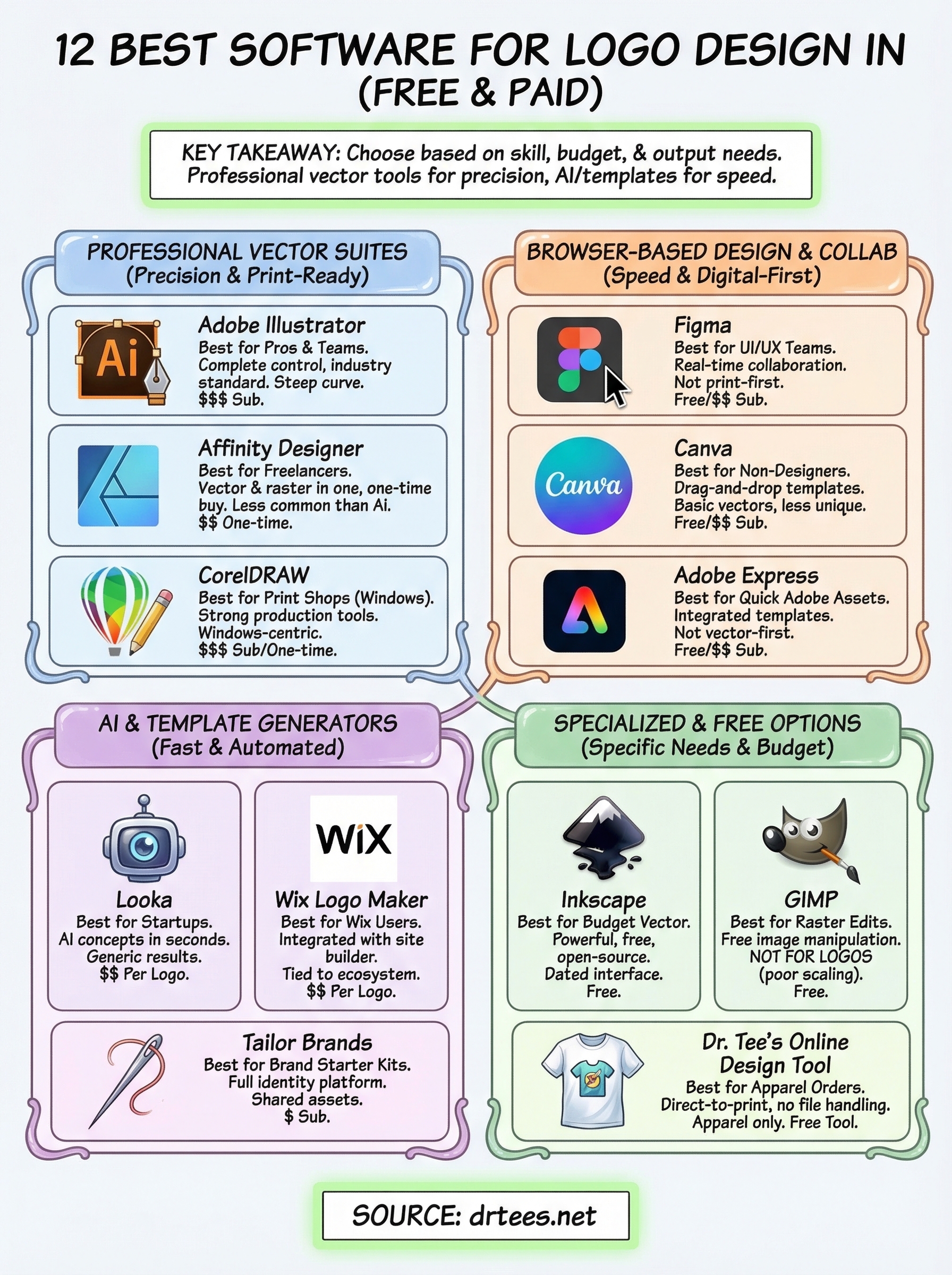
You now have a clear picture of what the best software for logo design looks like across every skill level and budget. The right choice depends on how much control you need, how fast you need results, and what you plan to do with the file once it is finished. Professional vector tools like Illustrator and Affinity Designer give you the most flexibility for production, while AI generators and template platforms work well when speed matters more than uniqueness.
Once your logo is ready, the next step is getting it onto your branded apparel, uniforms, or promotional items. Dr. Tee’s Design & Screen Printing has handled that transition from logo file to finished product for businesses across Kansas City for over 20 years. Whether you bring your own artwork or need help getting it print-ready, the process is straightforward. Start your custom apparel order today and see how quickly you can go from design to delivery.
