
Adobe Illustrator remains the go-to software for creating vector graphics, logos, and print-ready artwork, the same tools we use daily at Dr. Tee’s Design & Screen Printing to produce crisp, professional designs for our clients. Whether you’re a business owner wanting to understand the design process or a creative looking to level up, quality Adobe Illustrator tutorials can accelerate your learning and save you hours of frustration.
The right tutorial matches your current skill level and teaches techniques you’ll actually use. Maybe you need to clean up a logo for screen printing, create social media graphics, or design custom apparel artwork from scratch. Whatever your goal, structured learning beats random YouTube searches every time.
This guide covers eight tutorials worth your time, organized from foundational skills to advanced techniques, so you can find exactly what you need and start improving immediately.
1. Adobe Learn Illustrator get started series
Adobe’s official get started series gives you free, structured lessons that cover every foundational skill you need to create professional vector graphics. You work through real projects like designing a logo, creating social media graphics, and building print-ready artwork, which means you learn by doing instead of just watching. The series walks you from opening Illustrator for the first time to exporting finished designs ready for screen printing or digital use.
What you will learn
You master the essential tools and workflows that professional designers use daily. The series covers artboards, the pen tool, shape building, color application, typography basics, and layer management. Each lesson builds on the previous one, so you develop a logical understanding of how Illustrator functions rather than memorizing disconnected tricks. By the end, you can create vector logos, edit existing artwork, and prepare files correctly for print production.
Why this tutorial works for fast progress
Adobe structures these lessons to eliminate common beginner mistakes that waste hours of learning time. You follow along with downloadable practice files, which removes the guesswork from setup and lets you focus on learning techniques instead of troubleshooting. The tutorials skip unnecessary features and concentrate on the 20% of tools you’ll use 80% of the time, making your progress visible within the first few sessions.
Starting with official Adobe tutorials ensures you learn the correct workflow from day one, not workarounds that create problems later.
Best for
This series works best if you’re completely new to Illustrator or switching from basic design software. Business owners who need to understand design conversations, marketing coordinators who want to edit vendor files, and aspiring designers all benefit from this foundation. You don’t need prior design experience, just willingness to practice each lesson before moving forward.
Time commitment and pacing
You can complete the core series in 5 to 8 hours if you work through it consistently. Breaking this into 30-minute daily sessions lets you practice between lessons and retain more information than cramming everything at once. Most people finish the fundamentals within two weeks while maintaining their regular schedule.
Cost and access
Adobe provides this series completely free through their Learn platform. You need an Adobe account to track progress, but access doesn’t require an Illustrator subscription. However, following along requires either purchasing Illustrator or using the free trial to practice the techniques as you learn them.
2. Adobe Learn Illustrator tutorial library
Adobe’s tutorial library expands beyond the beginner series to include hundreds of focused lessons organized by skill level and project type. Each tutorial addresses a specific design challenge you can apply immediately, from creating custom patterns to mastering gradient meshes. You search by technique, industry, or desired outcome, which means you learn exactly what you need without sitting through unrelated content.
What you will learn
The library covers specialized techniques that solve real design problems. You find tutorials on advanced typography, complex shape manipulation, 3D effects, perspective drawing, and professional illustration workflows. Each lesson includes downloadable practice files and teaches you skills applicable to client work, personal projects, or business branding needs.
How to pick the right tutorial for your goal
Start by identifying your immediate design need rather than browsing randomly. If you’re preparing artwork for screen printing, search for tutorials on setting up artboards, using spot colors, or creating vector graphics at scale. The skill level tags help you avoid lessons that assume knowledge you haven’t learned yet.
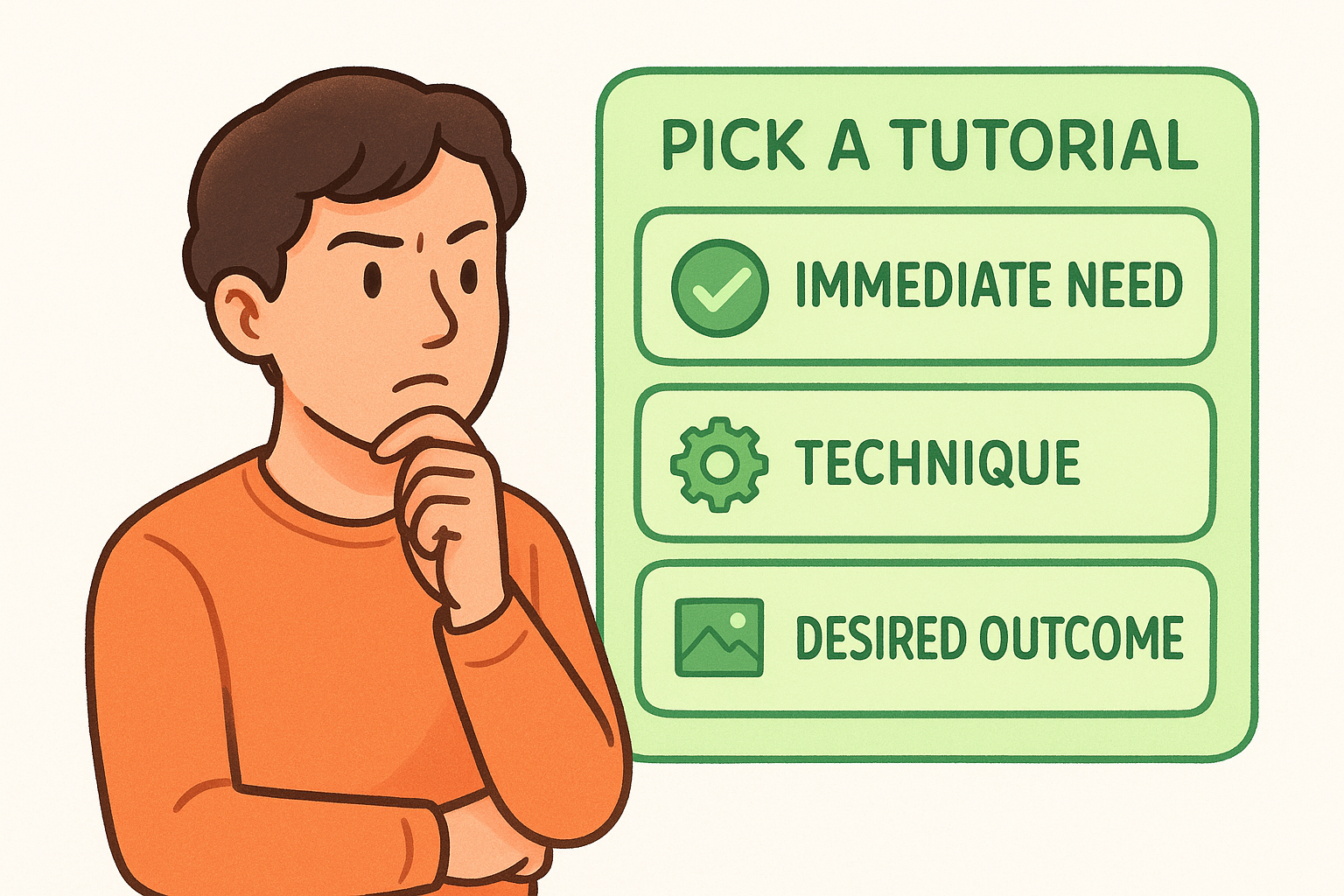
Choose tutorials that produce a finished deliverable you can actually use, not just demonstrate a cool effect.
Best for
This library serves designers who already understand Illustrator basics and need to solve specific problems. You benefit most when you know what you want to create but lack the technical knowledge to execute it. Business owners expanding their design capabilities and intermediate users advancing to professional-level work both gain practical skills from these adobe illustrator tutorials.
Time commitment and pacing
Individual tutorials run 5 to 20 minutes depending on complexity. You complete most lessons in a single session, making this format ideal for learning during lunch breaks or between projects. Focus on mastering one technique before moving to the next rather than collecting half-finished skills.
Cost and access
Adobe provides the entire library free with an Adobe account. You don’t need an active Illustrator subscription to watch tutorials, though practicing along requires access to the software through purchase or trial.
3. Adobe Illustrator Desktop Help by Adobe
Adobe’s Desktop Help functions as an interactive reference system built directly into Illustrator, giving you instant access to explanations, walkthroughs, and troubleshooting guides without leaving your workspace. This resource delivers context-sensitive assistance based on the tool you’re using or the problem you’re solving, making it faster than searching through external adobe illustrator tutorials. You access detailed information about every feature while actively working on your design projects.
What you will learn
The Desktop Help covers every Illustrator feature with technical explanations, step-by-step instructions, and visual examples. You discover how specific tools function, learn keyboard shortcuts, understand panel options, and troubleshoot errors. Each article explains why features work the way they do, not just how to click buttons, which builds deeper understanding of the software.
How to use it like a tutorial, not a manual
Search for action-based queries instead of feature names to get practical guidance. Type “create compound shapes” rather than “pathfinder panel” to find instructions that walk you through complete tasks. Following the step-by-step procedures in order transforms reference material into hands-on learning that produces finished results.
Treating Help articles as mini-tutorials lets you solve immediate problems while building long-term skills.
Best for
Desktop Help works best when you encounter specific obstacles during actual design work. You benefit most if you already understand basic workflows and need clarification on advanced features or technical specifications for print production.
Time commitment and pacing
You spend 2 to 10 minutes per topic depending on complexity. Consulting Help as questions arise creates natural pacing without requiring dedicated learning sessions.
Cost and access
Desktop Help comes free with Illustrator and requires no separate account or internet connection after initial software installation.
4. Envato Tuts+ Adobe Illustrator for beginners course
Envato Tuts+ delivers a comprehensive beginner course that teaches Illustrator through structured video lessons and hands-on projects. The course breaks down complex concepts into digestible segments that build your skills progressively, from understanding the interface to creating finished artwork. You receive lifetime access to all course materials, which means you learn at your own pace without subscription pressure.
What you will learn
The course covers essential design fundamentals including shape creation, color theory application, typography basics, and layer organization. You practice with the pen tool, master alignment and distribution, work with gradients and patterns, and learn proper file export settings for both print and digital use. Each lesson produces a tangible result you can add to your portfolio.
Key lessons to prioritize first
Focus on the artboard setup and shape tools modules before advancing to more complex techniques. These foundational skills apply to every project you create. The pen tool and pathfinder lessons deserve extra practice time since they form the core of vector illustration work and appear in professional workflows daily.
Mastering basic shapes and the pen tool first makes every advanced technique easier to learn and apply.
Best for
This course serves absolute beginners who want structured progression without guessing what to learn next. You benefit most if you prefer video instruction over reading documentation and need practical project examples rather than theoretical knowledge.
Time commitment and pacing
You complete the core curriculum in 6 to 8 hours of focused study. Breaking this into weekly sessions gives you time to practice between lessons and retain techniques better than rushing through everything at once.
Cost and access
Envato Tuts+ requires a monthly subscription starting around $16.50, though they offer occasional promotional rates and free trials for new users.
5. Adobe Illustrator more advanced tutorials playlist on YouTube
YouTube hosts countless Illustrator playlists, but Adobe’s own advanced tutorials playlist delivers professionally produced lessons that skip beginner repetition and dive straight into complex techniques. These adobe illustrator tutorials focus on real-world challenges professional designers encounter, from creating intricate illustrations to preparing files for commercial production. You access immediate visual demonstrations that show exactly how experts approach advanced design problems.
What you will learn
The playlist covers specialized techniques including 3D object creation, complex gradient meshes, advanced blend modes, and perspective grid workflows. You discover how to create photorealistic illustrations, manipulate anchor points with precision, and build reusable design systems that speed up your workflow. Each video demonstrates techniques you apply immediately to client work or personal projects.
Skills you can build fastest from this playlist
You master shape manipulation and color blending quickly since these videos show multiple approaches to the same problem. The pathfinder tutorials teach you to create complex logos in minutes instead of hours. Videos on advanced typography effects deliver professional results faster than experimenting on your own.
Watching experts work through complex designs reveals shortcuts and workflows that take years to discover independently.
Best for
This playlist serves designers who already understand Illustrator fundamentals and need to expand their technical capabilities. You benefit most if you’re preparing portfolio pieces, taking on more complex client work, or competing for professional design positions.
Time commitment and pacing
Individual videos run 8 to 15 minutes each. You complete most tutorials in a single sitting, making this format ideal for focused skill development between projects.
Cost and access
YouTube provides these tutorials completely free with no account required, though practicing along needs Illustrator access through subscription or trial.
6. Creative Bloq Illustrator tutorials roundup
Creative Bloq curates a regularly updated collection of high-quality adobe illustrator tutorials from professional designers and industry experts. This roundup aggregates the best instructional content from across the web, saving you hours of searching through mediocre videos and outdated posts. You access diverse teaching styles and approaches in one place, from quick technique demonstrations to comprehensive project walkthroughs that build complete designs from scratch.
What you will learn
The roundup covers techniques across all skill levels, including logo design, character illustration, package design, and advanced effects. You find tutorials on creating isometric artwork, mastering the gradient mesh tool, building custom brushes, and designing professional-quality illustrations for commercial use. Each featured tutorial focuses on producing finished work rather than isolated effects.
How to choose tutorials that match your skill level
Creative Bloq labels most tutorials with difficulty indicators that help you avoid frustration from jumping too far ahead. Read the tutorial descriptions completely before starting to verify the techniques align with skills you already possess. Starting with intermediate tutorials when you only know basics wastes time and creates confusion.
Matching tutorial difficulty to your current abilities keeps you progressing steadily instead of getting stuck on advanced concepts.
Best for
This resource works best for self-directed learners who want exposure to different teaching styles and design approaches. You benefit most if you enjoy variety and learn better from multiple instructors rather than following one structured course.
Time commitment and pacing
Tutorial length varies from 10 minutes to several hours depending on project complexity. You choose lessons that fit your available time and skill development goals.
Cost and access
Creative Bloq provides this roundup completely free through their website, though some linked tutorials may require accounts or subscriptions on their original platforms.
7. Noble Desktop guide to learning Illustrator
Noble Desktop provides a comprehensive roadmap that outlines multiple learning paths for mastering Illustrator, from free resources to professional certification programs. This guide aggregates curated recommendations for self-paced study, instructor-led courses, and bootcamp options that fit different schedules and budgets. You receive strategic advice on building skills progressively rather than randomly collecting disconnected adobe illustrator tutorials that leave gaps in your knowledge.
What you will learn
The guide maps out essential skill categories you need to master at each learning stage, including vector drawing fundamentals, typography, color theory, and production workflows. You discover which techniques matter most for specific career paths like graphic design, UI/UX design, or digital illustration, helping you focus study time where it delivers the greatest professional value.
How to build a learning plan from this guide
Noble Desktop organizes learning options by time commitment and cost, letting you match resources to your current situation. Start by identifying your skill level and career goal, then follow their recommended sequence from foundational concepts through advanced techniques. The guide shows you how to combine free resources with structured courses for maximum progress.
Following a strategic learning plan prevents wasting time on random tutorials that don’t build toward your actual goals.
Best for
This guide serves career changers and serious learners who want structured progression toward professional competency rather than casual skill development.
Time commitment and pacing
You spend 10 to 15 minutes reviewing the guide to map your learning path, then follow your chosen resources at your own pace.
Cost and access
Noble Desktop provides the guide completely free through their website without requiring account creation or personal information.
8. Jotform list of Illustrator tutorials
Jotform compiled an extensive directory of adobe illustrator tutorials spanning beginner basics through expert-level techniques, pulling together resources from multiple platforms and instructors into a single browsable page. This aggregated list includes video courses, written guides, and project-based tutorials that cover diverse design applications from logo creation to complex illustration workflows. You access dozens of vetted learning resources without spending hours evaluating individual tutorials for quality and relevance.
What you will learn
The list encompasses fundamental skills like working with shapes and the pen tool alongside specialized techniques including package design, character creation, and advanced effects. You find tutorials on creating specific design types such as badges, posters, infographics, and patterns that translate directly into client work or portfolio pieces.
How to use a big list without getting overwhelmed
Start by scanning the list for project types that match your immediate needs rather than working through sequentially. Choose three to five tutorials that build toward a specific goal, complete those fully, then return for your next skill development target. Bookmarking relevant tutorials for later prevents decision paralysis when you browse.
Focusing on outcome-based tutorials that produce finished work keeps you progressing instead of collecting half-learned techniques.
Best for
This resource serves exploratory learners who want exposure to different teaching styles and design approaches without committing to structured courses.
Time commitment and pacing
Tutorial length varies widely from 15 minutes to multiple hours based on complexity and instructor style.
Cost and access
Jotform provides this list completely free through their blog, though individual tutorials may require accounts or subscriptions on their original platforms.
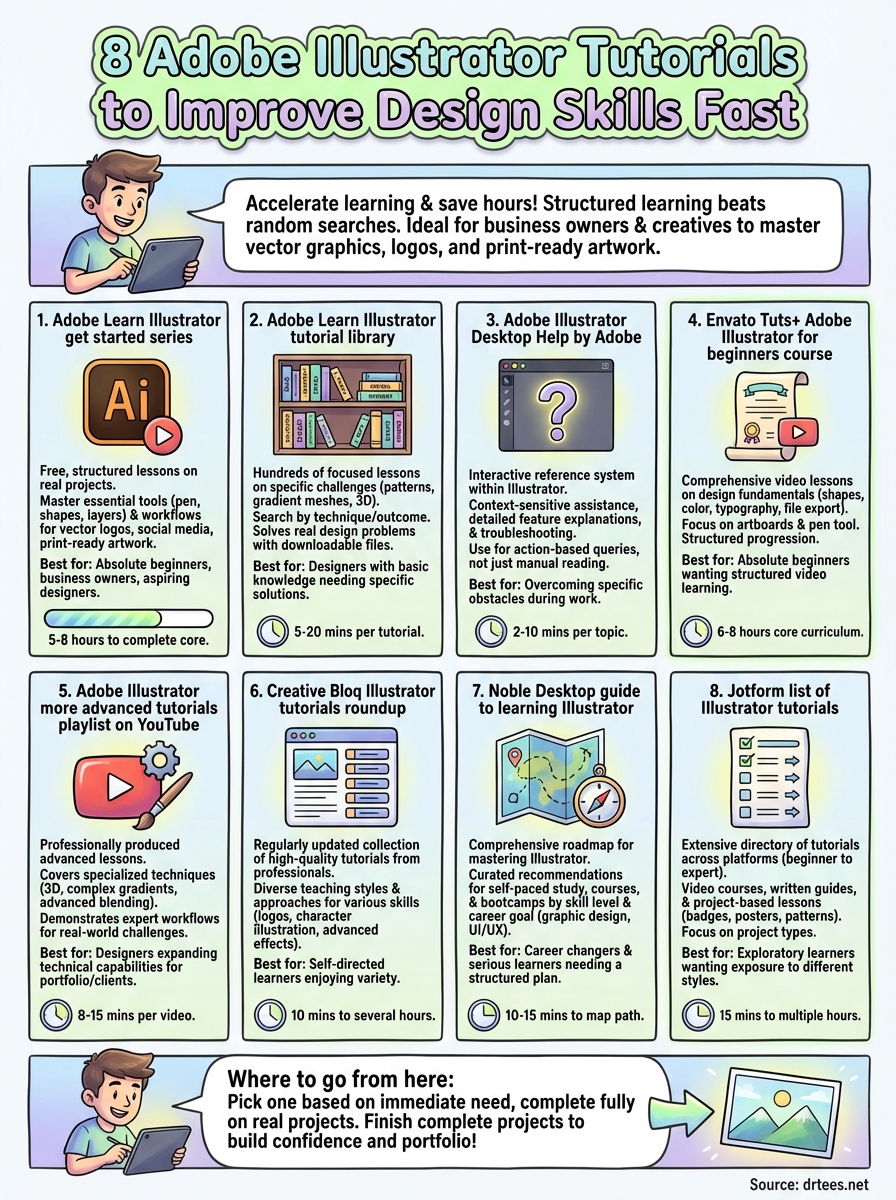
Where to go from here
These eight adobe illustrator tutorials give you structured paths to master the software without wasting time on outdated or incomplete resources. You now know which tutorials match your current skill level and design goals, whether you need basic shape tools or advanced gradient meshes. The key to fast progress lies in finishing complete projects rather than collecting random techniques, which builds both confidence and portfolio-worthy work.
Pick one tutorial from this list based on your immediate design need and commit to completing it fully before moving to the next resource. Practicing each technique on real projects rather than hypothetical exercises cements the skills into long-term memory and reveals how they apply to actual work. When you’re ready to turn your designs into professional printed products or need expert help preparing files for screen printing, explore how we handle the design and printing process to bring your custom apparel projects to life.
